Paying without a wallet
How to pay with Bitcoin
You do not need a crypto wallet or any experience with Bitcoin. If you have Cash App or Venmo, you can buy the exact amount and send it in a few minutes. This page walks through both, and the three mistakes that stop a payment from going through.
What happens when you choose Bitcoin at checkout
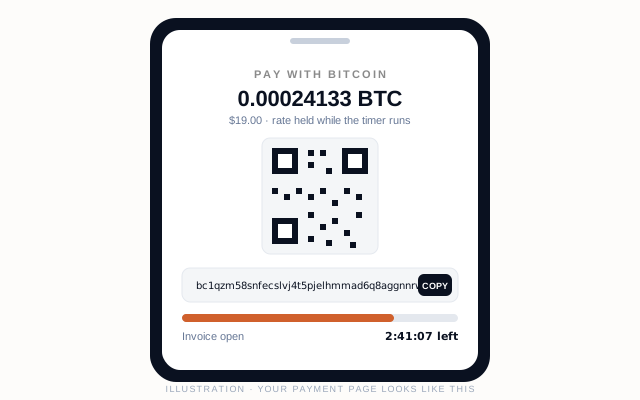
Placing the order does not take any money. It creates an invoice and sends you to a payment page showing a Bitcoin address, a QR code and the exact amount of bitcoin to send. That amount is locked at the current exchange rate for 180 minutes.
Your order is held for you the moment it is placed. It is confirmed once the network sees your payment and records one confirmation, which usually takes about ten minutes after the bitcoin leaves your app. You get an email when the order is placed, another when the payment confirms, and a third with tracking when it ships.
One tip that removes most of the stress: buy the bitcoin in your app first, then place the order. Buying is instant, and it means the 180-minute clock only starts once you are ready to send.
Pay from Cash App
Cash App sells bitcoin and can send it to any Bitcoin address. The first time, it will ask you to verify your identity and enable bitcoin withdrawals; allow a few minutes for that.
- 1 · Buy the bitcoin
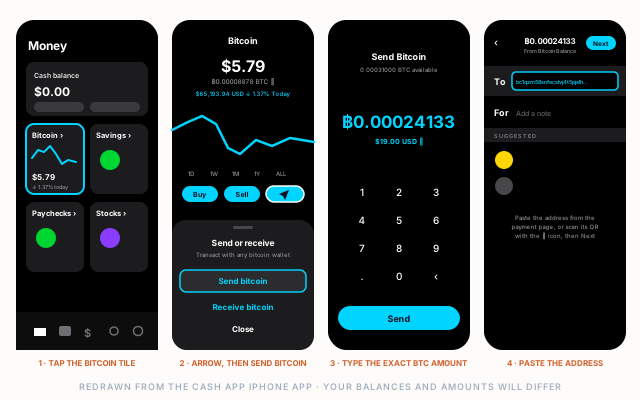
- On the Money tab, tap the Bitcoin tile, then Buy. Buy slightly more than the invoice amount so the network fee does not leave you short.
- 2 · Start a send
- On the Bitcoin screen, tap the arrow button next to Buy and Sell. A sheet titled Send or receive opens; tap Send bitcoin.
- 3 · Enter the exact amount
- Cash App asks for the amount first. Tap the toggle so you are typing in BTC, not dollars, and enter the bitcoin amount shown on the payment page. Cash App shows its fee separately later; the amount you enter is what arrives.
- 4 · Enter the address
- In the To field (it reads Name, $Cashtag, BTC address), paste the address from the payment page, or tap the scan icon and point it at the payment page's QR code. Check the first and last few characters match. Bitcoin payments cannot be reversed.
- 5 · Choose Priority speed
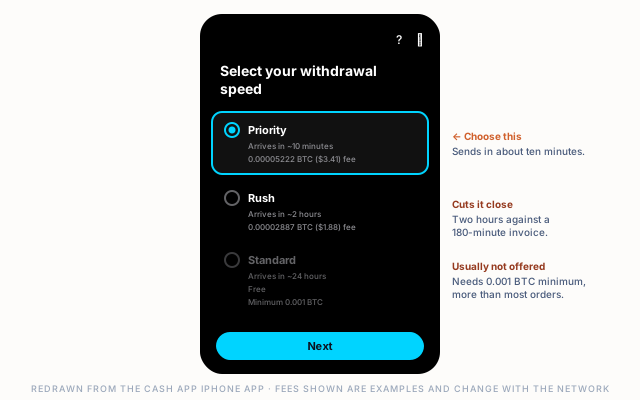
- Cash App lists Priority (about 10 minutes), Rush (about 2 hours) and Standard (about 24 hours, free, but only for 0.001 BTC or more, so it is usually not even offered for an order this size). Your invoice is open for 180 minutes: Rush usually makes it with little margin, so choose Priority. Its fee is shown in bitcoin and dollars before you confirm.
- 6 · Confirm and keep the page open
- Tap Next, confirm with your Cash PIN, then go back to the payment page. It updates on its own when the payment is seen, and again when it confirms.
Pay from Venmo
Venmo sells bitcoin and can transfer it to an external Bitcoin address. Identity verification is required before transfers are allowed, so complete that first if you have not.
- 1 · Buy the bitcoin
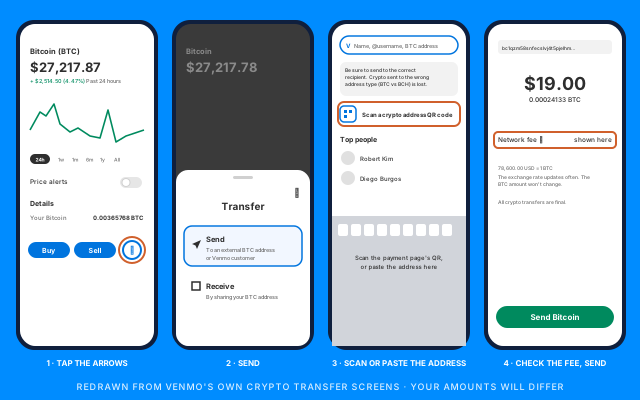
- Open the Crypto tab, choose Bitcoin and buy slightly more than the invoice amount to cover the network fee.
- 2 · Start a transfer
- On the Bitcoin screen, tap the round arrows button next to Buy and Sell. A Transfer sheet opens; tap Send, which is labelled for an external BTC address or Venmo customer.
- 3 · Scan or paste the address
- The recipient screen has a search field reading Name, @username, BTC address and a Scan a crypto address QR code option. Scanning the payment page's QR code is the safest; if you paste instead, check the first and last few characters match. Venmo's own warning applies: bitcoin sent to the wrong address type is lost.
- 4 · Enter the amount and check the fee
- Enter the bitcoin amount from the payment page. The review screen shows the network fee on its own line and notes that the BTC amount will not change even if its dollar value does. Make sure the amount arriving at the address equals the invoice amount.
- 5 · Send Bitcoin
- Tap Send Bitcoin. Venmo says external transfers take from a few minutes to a few hours depending on network congestion, so send as soon as the invoice is open rather than waiting. All transfers are final.
The three things that make a payment fail
Almost every problem with a Bitcoin payment is one of these.
- Sending less than the invoice
- Fees or rounding can leave the payment a little short. The payment page shows the remaining amount; send the difference to the same address before the timer runs out and the invoice completes.
- Choosing the wrong network
- This store accepts on-chain Bitcoin only, not Lightning. If your app asks which network to use, choose Bitcoin. A payment sent on a different network cannot be recovered.
- Running out of time
- The invoice holds its rate for 180 minutes, about 3 hours. Cash App's Standard speed can take up to 24 hours, Rush about two, and Venmo transfers slow down when the network is busy. Buy first, send promptly, and on Cash App choose Priority.
If the invoice expires or the amount is short
Nothing is lost. Bitcoin sent to the address on your invoice still arrives there even after the timer ends; it just is not matched to your order automatically. Reply to your order email or contact support with your order number and the app you paid from, and we will match the payment by hand and confirm your order.
If you have not sent anything yet and the invoice has expired, simply place the order again for a fresh invoice at the current rate.
Using another app or exchange
Any wallet or exchange that can send on-chain bitcoin works the same way: paste the address, send the exact amount, and keep the payment page open. Check the same three things above, especially that you are sending on the Bitcoin network and within the 180-minute window.